A look at what Slash Commands do in Claude Code, where they fall short, and why they are being absorbed into the Skill system

19 min read
2 days ago
Press enter or click to view image in full size

In the previous article, we talked about Claude Code’s CLAUDE.md,
which tells Claude Code what it should know before entering a project,
including the project background, collaboration constraints, and working
boundaries that should be made explicit up front. But once that static
context is in place and you begin using it day to day, another practical
question quickly comes up: when dealing with recurring tasks like code
review, committing changes, or generating summaries, how do you get
Claude Code to work in a more stable and consistent way every time?
Slash Commands were created for exactly this problem. On the surface,
they are just commands that start with /, but behind them
is really a named task entry point with a set of workflow conventions.
That is the topic we will continue exploring in this article.
What Is a Slash Command
When
people first see a Slash Command, many instinctively think of it as an
ordinary terminal command. But in Claude Code, a more accurate way to
describe it is as a named task entry point. When you type commands like /clear or /compact, you are invoking built-in Claude Code capabilities. When you type commands like /review, /commit, or /submit-pr
that your team defines for itself, what you are really invoking is a
prewritten prompt template. From the usage experience, it feels like a
command. From the implementation side, it is closer to a layer that
turns prompts into reusable, structured, named building blocks.
What
makes Slash Commands interesting is not that they save you a bit of
typing. The real value is that they turn temporary instructions
scattered across chat into stable entry points you can call again and
again. You no longer need to repeatedly explain things like “review this
code,” “write a commit message in the team format,” or “summarize this
PR using the standard structure.” Instead, you can collapse those
actions into a /command and let Claude Code enter the corresponding work mode directly.
Personal Commands and Project Commands
Press enter or click to view image in full size
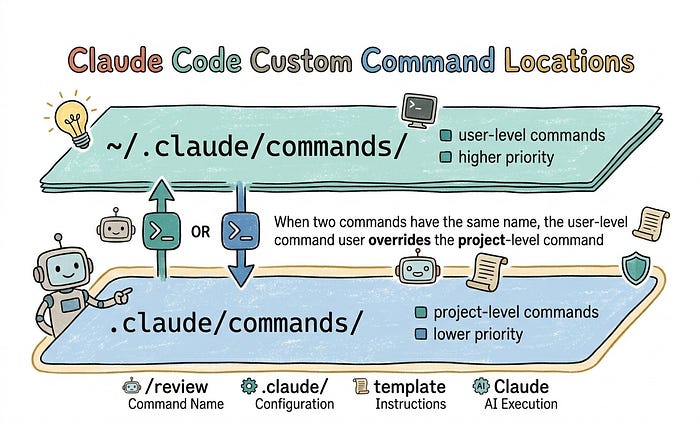
For custom Slash Commands in Claude Code, the official model mainly supports two scopes. One is personal commands stored under ~/.claude/commands/. The other is project commands stored in the repository's .claude/commands/
directory. The difference is not in the syntax, but in who they are
meant to serve. Personal commands are better for codifying your own
long-term habits, such as review templates, commit templates, or
debugging prompts you use frequently. Project commands are better for
shared team workflows, so everyone on the team can trigger the same task
in the same way.
Although these two kinds of commands look like they differ only by storage path, the value behind them is actually quite different. Personal commands are about individual efficiency. You can organize the prompts you rely on most into a stable toolkit. Project commands are about team consistency, because they live in version control with the repository, allowing the commands themselves to become part of the collaboration standard. Put differently, one captures your personal workflow habits, while the other captures the AI workflow of the project.
Scope Relationship
There is another point here that is easy to misunderstand: do not directly map the scope model of Slash Commands onto the CLAUDE.md scope model discussed in the previous article. CLAUDE.md
works more like a set of context rules that narrow as you move down the
directory tree. The closer it is to the current working directory, the
more specific the constraints usually become, and the higher the
priority tends to be. Slash Commands do not follow that logic. If both ~/.claude/commands/ and .claude/commands/ contain commands with the same name, the user-level version wins. In other words, ~/.claude/commands/ overrides the project-level .claude/commands/.
That means the scope model of Slash Commands is more like personal overrides project, not project overrides personal based on proximity. Why design it this way? The main reason is security. The project-level .claude/commands/
directory lives in the Git repository, which means anyone with write
access to the repo can modify it. If project-level commands took
priority instead, someone could submit a same-named command and quietly
override your local personal command. That creates a potential prompt
injection attack surface, because a malicious PR does not need to change
source code to be harmful. It could alter a command and silently
redirect your workflow entry point so Claude Code follows a different
set of instructions without you noticing.
What is prompt injection? It refers to influencing the task a model is supposed to perform by tampering with prompts, instruction files, or external input. In a tool like Claude Code that reads project files, command files themselves can become part of the attack surface.
How Slash Commands Work
Press enter or click to view image in full size
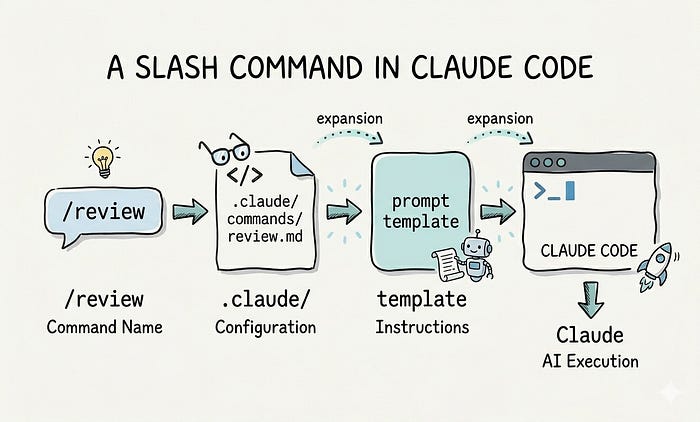
From
an implementation perspective, a custom Slash Command is usually just a
Markdown file. The filename becomes the command name, and the file
content defines what Claude Code should do when that command runs. You
can think of it as a named prompt file. At runtime, you type /command-name [arguments],
Claude Code reads the corresponding file, and then substitutes the
arguments you passed into the prompt. So at its core, it is still a
fixed template, just one that can accept runtime parameters. The current
official documentation has merged this explanation into the Skill docs,
but the same parameter substitution rules still apply to .claude/commands/.
If you only look at the definition, it can still feel a bit abstract. So let’s go through a few examples to see how Slash Commands actually work.
First, without parameters.
This is the simplest case. Whatever is written in the command file is what Claude Code executes.
---
description: Review current working tree changes
---Review the current uncommitted changes and focus on:
- correctness
- regression risk
- missing tests
Run it in Claude Code:
/review-current- If this file is stored at
.claude/commands/review-current.md, the corresponding command is/review-current - Because it takes no parameters, Claude Code only needs to read the fixed template and execute the task it defines
- This kind of command works well for high-frequency tasks with very stable input structure, such as reviewing current changes, summarizing the current session, or checking recent commits
Second, with one parameter.
If a command only needs a single complete input, $ARGUMENTS is usually the most intuitive option because it represents everything the user typed after the command name.
---
description: Check today's weather for a city
---Show today's weather for $ARGUMENTS.
If the city name is ambiguous, ask for clarification first.
Run it in Claude Code:
/weather Beijing- In this example, if the file path is
.claude/commands/weather.md, the command is/weather - The
Beijingin/weather Beijingwill be substituted directly into$ARGUMENTS - When there is only one argument,
$ARGUMENTSis more intuitive because it means all arguments after the command name - This style also has a practical benefit: if you enter
/weather New York, thenNew Yorkcan be treated as one complete unit
Third, with multiple parameters.
If a command needs to distinguish between parameters by position, then $ARGUMENTS[N], or its shorthand form $0, $1, $2, is usually a better fit.
---
description: Migrate a component between frameworks
---Migrate the $0 component from $1 to $2.
Preserve all existing behavior and tests.
Run it in Claude Code:
/migrate SearchBar React Vue$0maps toSearchBar$1maps toReact$2maps toVue- This position-based style fits tasks like migration, conversion, and batch processing where the argument structure is explicit
The official docs describe the substitution rules like this: $ARGUMENTS means all arguments, $ARGUMENTS[N] means the Nth argument in order, so $ARGUMENTS[0] is the first argument and $ARGUMENTS[1] is the second. $N is simply shorthand for $ARGUMENTS[N].
There is another easy-to-miss detail: Claude Code only appends your
input arguments to the end automatically when the template contains none
of these placeholders at all, such as $ARGUMENTS, $0, or $1. As soon as the template already handles any placeholder explicitly, those arguments will not be appended again.
The operating model of a Slash Command is actually very straightforward: define a task with a fixed template, then fill in parameters when calling it. It does not change the capability boundary of Claude Code. What it changes is how tasks are organized. Things you used to explain ad hoc in a conversation can now be written ahead of time as reusable task entry points.
Why Slash Commands Are Needed
When
people first encounter Slash Commands, one question usually comes up
right away: if we can already send prompts directly to Claude Code, why
wrap them in another /command layer at all? If you only ask
an occasional ad hoc question, plain chat is absolutely enough. But
once you ask Claude Code to handle recurring work on a regular basis,
you start to realize that the hardest part is often not the task itself.
It is having to restate the task clearly every single time.
Before Slash Commands, the interaction often looked more like this:
review this code
write tests for this function
refactor this module
The benefit of this style is flexibility. You can say whatever comes to mind. But as soon as tasks start repeating, many of the problems that flexibility hides begin to surface. Slash Commands were introduced to address exactly that. They are not just a shorter way to write prompts, and they are not merely a convenience shortcut. What they really do is turn scattered prompt usage into reusable and predictable task entry points. Put another way, they move free-form prompts toward structured workflows, which is also the first step in taking Claude Code from chat-style usage toward engineering-style collaboration.
If you break the problem down, Slash Commands are mainly dealing with the following issues, and that is where their value comes from.
- Inconsistent task expression: two people may describe the same code review task very differently, so Claude Code ends up receiving different versions of what is supposed to be the same work. Commands standardize the prompt so one class of task is expressed consistently.
- No unified task entry point: in real team workflows, some recurring tasks can only be triggered through temporary prompts unless you define a stable entry point. That means the phrasing has to be rebuilt each time, and the team has a harder time converging on a known, shared way to invoke the task.
- Unpredictable behavior: even when the task category is the same, changing prompt phrasing changes what Claude Code focuses on, which makes the output more volatile. Fixed commands stabilize the task description and make the results more consistent.
If you look one level deeper, Slash Commands serve another purpose that people often underestimate: they force us to clarify the task itself. When a prompt works inconsistently, the problem is not always that the model is weak. Often it is that we have not thought through the goal, boundaries, or expected output of the task clearly enough. Once a command is meant to be reused long term, it becomes difficult to keep describing the task in a vague, temporary way full of unspoken assumptions. That process of tightening the task description is already improving the quality of the workflow.
These issues make Claude Code’s performance fluctuate easily with prompt wording. The role of Slash Commands is to standardize how common tasks are expressed so collaboration becomes more stable.
Common Misconceptions About Slash Commands
People often develop extra expectations about Slash Commands. But if you do not understand their boundaries first, it becomes easy to overestimate what they actually do. So here are a few common misconceptions worth clearing up.
Can Slash Commands Reduce Context Size?
This
misconception is very common. On the surface, you may have gone from
typing a long task description into the chat box to simply entering /review or /commit.
The visible input is clearly shorter, so it is easy to assume that if
all you sent to Claude Code is one short command, then less content must
have entered the context as well.
Here is the conclusion first: Slash Commands do not fundamentally reduce context size. What they really optimize is how context is organized and when it gets injected. A Slash Command is still a prompt at its core. The only difference is that the prompt was written ahead of time into a named template. It does not magically compress the information that still needs to be conveyed, and it does not make the same information consume fewer tokens out of nowhere.
What it really changes is how we work with that context. Previously, you might have had to type the same instruction block manually each time. Now it can live inside a command template and does not need to be rewritten over and over. Previously, some instructions could only be improvised inside the conversation. Now they can be injected at the start of the task in a stable way. That certainly makes the experience cleaner, but a cleaner experience does not mean the information disappeared. It simply moved from ad hoc chat text into a more organized and fixed input.
So a more precise way to put it is that Slash Commands solve a context management problem, not a context compression problem. If a task genuinely requires a lot of background, steps, constraints, and output formatting, then all of that still needs to enter the context after you turn it into a Slash Command. The only difference is that it enters in a more stable and more organized way.
Are Slash Commands More Powerful Than Ordinary Prompts?
This misconception is also easy to understand, because in practice many people notice that for tasks like code review, debugging, or summary writing, some Slash Commands produce better results than a one-line ad hoc prompt. So it is natural to interpret the difference as if the Slash Command itself were somehow more powerful.
But what is usually doing the work here is not the Slash Command format itself. It is that the task instructions behind it were already organized in advance. The boundaries are clearer, the steps are more complete, and the output requirements are more explicit. In other words, what looks like a more powerful command is often just a better-written prompt.
Seen from the other direction, if a Slash Command still wraps a vague, messy, ill-bounded prompt, it will not become useful just because it was given a name. Naming it does not automatically turn it into a high-quality workflow. So the more accurate statement is this: a Slash Command is not stronger model capability, but stronger workflow packaging. It does not raise the model’s ceiling. What it improves is the stability of task expression and the chance that a good prompt gets reused consistently.
The Official Shift: Skills Are Replacing Slash Commands
Up to this point, we have been talking about how useful Slash Commands can be. But if you look at Claude Code’s current official documentation, you will notice that the official framing has already changed. Slash Commands are no longer treated as a fully separate mechanism. Instead, this part of the model has already been folded into Skills.
This is not just a naming change. The official way of organizing the capability has changed. The docs make it explicit that custom commands have been absorbed into Skills. A command stored at .claude/commands/deploy.md and a Skill stored at .claude/skills/deploy/SKILL.md can both ultimately produce the same /deploy entry point. Existing .claude/commands/
files still continue to work, which shows that Slash Commands have not
been removed outright. Instead, they are being brought under the broader
Skill system.
The newer Skill model is a more complete organizational structure. It provides SKILL.md
as the main entry, supporting files as supplemental material, front
matter to control automatic invocation and permission boundaries, and
the ability to auto-load a Skill in relevant scenarios. These are all
things the traditional single-file Slash Command model was never
particularly good at.
Skills can trigger automatically
in relevant situations. The real value of that is that many tasks are
not things you would always remember to kick off with a command
manually. For example, if you just modified an authentication flow and
Claude Code can automatically bring in the security rules, compatibility
constraints, and test output for that situation, the workflow becomes
much more natural. You no longer have to stop and think about whether
you should manually invoke some tool first. Slash Commands, by contrast,
are explicitly triggered. They run when you decide to
call them. So when you know very clearly that you want to execute a
fixed workflow right now, typing a /command directly can still be the better choice.
What is worth focusing on now is no longer what the command looks like on the surface, but how the capability behind that command is organized. That underlying mechanism is the Skill system.
From Slash Commands to Skills: A Practical Case Study
To make this shift more concrete, we can run a small experiment for comparison. Imagine two nearly identical projects. One is command-demo, which uses a Slash Command to review and fix a security issue in auth.ts. The other is skill-demo,
which uses a Skill to complete the same task. The goal in both cases is
the same: read the code, inspect the tests, fix the defect, run the
tests, and then produce a fix report.
Both experiment projects contain the same business code and documentation. The real differences are concentrated mainly in .claude/ and a small number of supporting files.
common/
├── auth.ts
├── auth.test.ts
├── scripts/
│   └── latest-test-output.sh
└── docs/
    ├── security.md
    ├── compat.md
    └── report-template.md
First, look at the part unique to command-demo:
command-demo/
└── .claude/
    └── commands/
        └── review-auth-cmd.md
In command-demo, every requirement has to be packed into that single Slash Command file, .claude/commands/review-auth-cmd.md. In that one file, you need to tell Claude Code to read auth.ts and auth.test.ts, then look at docs/security.md and docs/compat.md, and finally produce output in the format defined by docs/report-template.md.
This can certainly work, and in the experiment it did fix the code
successfully. But once the number of files, constraints, and templates
grows, that command quickly turns into an ever-longer and
ever-harder-to-maintain prompt.
Now look at what is unique to skill-demo:
skill-demo/
├── .claude/
│   └── skills/
│       └── review-auth-skill/
│           ├── SKILL.md
│           └── README.md
On the skill-demo side, the organization is different. SKILL.md
only describes the main task. Security rules, compatibility
constraints, and report templates can each live in their own files and
be referenced only when needed. It can even inject the latest test
output directly into the Skill with something like !./scripts/latest-test-output.sh.
That keeps the main entry point from becoming bloated, while giving
constantly changing content a much more natural place to live.
What is dynamic context injection? It means running a command before the task begins so the latest script output, build state, or other runtime results are pulled into the context, instead of relying only on static instructions written ahead of time.
The difference is still not obvious if you only compare the directory structures. The real contrast appears once Claude Code actually runs both workflows. The result first: both sides fixed the issue successfully, and all tests passed. That shows the difference between Slash Commands and Skills is not whether one can read code, modify files, and run tests while the other cannot. Those capabilities come from Claude Code itself.
What matters more is that even though both sides completed the task, the resulting fixes were not identical in style. The command-demo
fix was somewhat more conservative. In addition to solving the security
issue, it also added object type checks and avoided leaking properties
by returning a new object. The skill-demo fix was more
direct and focused mainly on field validation. This does not mean Slash
Commands or Skills are "smarter." It shows that the model still has
non-determinism. Even when the same task is solved correctly, the
reasoning path and implementation details may differ. The real advantage
of Skills is not that they make the model stronger, but that they make
it easier to keep adding rules, constraints, and output formats later
while preserving a more stable structure for the workflow.
The table below summarizes the most notable results from the experiment.
Press enter or click to view image in full size
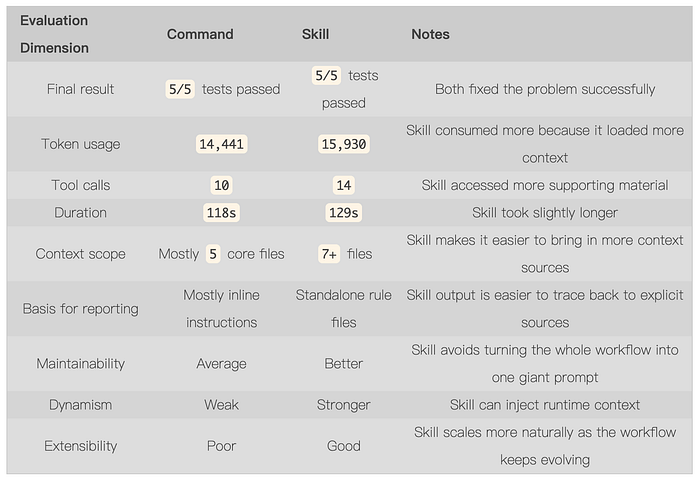
If you only look at the numbers in the table, Skill does not win on raw cost. It may consume a few more tokens, make a few more tool calls, and take a little more time. But what you get in exchange is more complete context packaging, clearer rule provenance, and a structure that is easier to maintain. For simple tasks, that tradeoff may not be worth it. But once a workflow starts involving multiple rule sets, historical decisions, dynamic information, and long-term reuse, the cost is usually justified.
Press enter or click to view image in full size
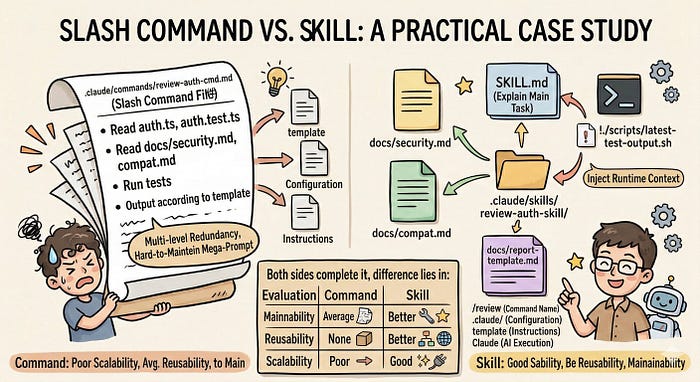
Next, based on this example, let’s continue looking at more of the differences between Slash Commands and Skills.
The Limitations of Slash Commands
At this point, a more important question naturally appears: if Slash Commands can also read code, edit files, and run tests, where exactly are their real limitations? Based on the earlier experiment, the more precise answer is not that they cannot handle complex tasks. It is that they are bad at expressing complex tasks in a stable and maintainable way. In other words, the problem is not the capability boundary. It is the engineering quality of the expression. The more complex the task becomes, the more rules it involves, the more mixed the context is, and the more dynamic information it depends on, the more obvious the problem becomes.
Weak Context Organization
The earlier command-demo
already shows the issue well. To make one command handle the task end
to end, we had to cram the code files, test files, security rules,
compatibility constraints, and reporting format all into the same .md
file. Yes, it runs, but it feels more like constantly stuffing
information into a block of static text than actually organizing that
information. As the task grows more complex, the file starts to look
less like a clean task entry point and more like an oversized
instruction manual.
Lack of Modular Context Reuse
This leads directly to a second problem: Slash Commands are not good at naturally breaking knowledge and rules into reusable modules. For example, security guidelines are one rule set, compatibility constraints are another, and a report template is yet another structure. In a real project, those materials are rarely used by only one task. But inside a command, they usually have to be copied into the prompt or rewritten again. The result is that multiple commands often end up carrying similar but not identical copies of the same rules. Over time, that creates both maintenance cost and content drift.
No Runtime Context Injection
The
third limitation comes from dynamic information. Commands are better at
holding a static instruction written in advance, but much weaker when
it comes to runtime context. Think about things like the latest test
output, the current build state, or environment information available
only right before execution. Those details often cannot be written into
the prompt ahead of time. One big reason the earlier skill-demo
feels more like a real workflow is that it can inject the latest test
results before execution, instead of making the model guess or relying
on us to manually fill in the missing context during the conversation.
Poor Extensibility, Leading to Giant Prompts
Slash Commands also run into a very practical problem: they are hard to extend gracefully. A command may begin as a lightweight file of a dozen lines, but once you keep adding rules, examples, restrictions, and output formatting, it quickly swells into a long file. Over time, that kind of file becomes difficult to maintain, because even a small change can affect the way the whole prompt reads.
Weaker Control, More Reliance on Model Interpretation
The last issue also matters a lot in real use: the behavior is still not controlled very stably. In the earlier experiment, both sides completed the task, but the resulting fix styles were not exactly the same. Of course, that is not entirely the fault of the command, because the model itself is non-deterministic. But with commands, the rules are often mixed into one long block of text, and the model has to decide for itself how to interpret them, how to rank their priority, and which requirements matter most. That pushes more of the tradeoff onto the model’s own judgment, which makes the behavior more likely to fluctuate.
How Skills Solve These Problems
If
you look at those issues together, the Skill approach can actually be
summarized quite simply: it turns content that previously had to be
stuffed into a single prompt into a clearer, structured system. The main
entry lives in SKILL.md, while rules, templates,
constraints, scripts, and supplementary materials can live separately.
Runtime information can also be pulled in right before execution. Once
that changes, the context no longer has to compete for space inside one
file, and the more complex the task gets, the more obvious the
difference becomes.
Because of that, the problems mentioned earlier, such as poor context organization, weak rule reuse, difficulty incorporating dynamic information, prompt files that keep growing, and unstable behavior, all improve together. Skills do not suddenly make the model itself more powerful. They finally give complex tasks a way to be organized like an engineering system, which is also why the official direction has gradually shifted toward Skills.
That said, Skills themselves still have many details worth discussing separately, such as how to organize supporting files, how dynamic injection works, and how automatic triggering cooperates with sub-agents. We will cover Skills in a dedicated follow-up article, so we will stop here for now.
Use Cases
Let’s also look at which usage scenarios each one fits best.
Press enter or click to view image in full size
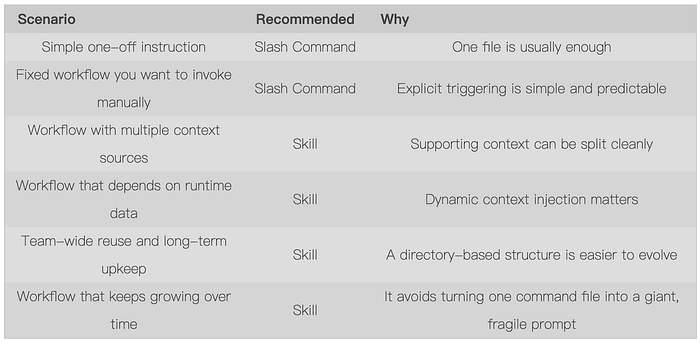
Strictly speaking, anything you can do with a Slash Command can also be done with a Skill. When the task is simple enough, writing a single-file command is cheaper and easier. But once you start dealing with multiple rule sets, dynamic information, team reuse, and long-term maintenance, Skill is usually the more appropriate choice.
Summary
This
article started with what Slash Commands are, then covered their scope,
parameter model, and why they became such an important layer of task
entry points in Claude Code. For fixed tasks that show up repeatedly,
the value of Slash Commands is not the /command syntax
itself. It is that they pin down recurring prompts into a stable form,
making task expression more consistent and collaboration more
predictable.
But once tasks become more complex, involving multiple rule sets, dynamic information, long-term maintenance, and team reuse, the single-file command model starts to struggle. That is also why the official focus has gradually shifted toward Skills. For day-to-day use, Slash Commands are often enough for simple tasks, while more complex workflows are better organized through Skills.
References
Follow along as we explore the latest AI and software development technologies together. If you have questions or thoughts, feel free to leave a comment.